amigo-labs

Pincel

Released

Pixel-art and image editor

A pixel-art and image editor for the web and the desktop: Aseprite-compatible sprites, tilemaps, slices and animation, plus layered editing of photos and screenshots with brushes, selections and effects. Open source, free, no account, no upload.

Version
1.12.0 · 12 November 2026
Platforms
Windows · macOS · Linux · Web
License
MIT OR Apache-2.0
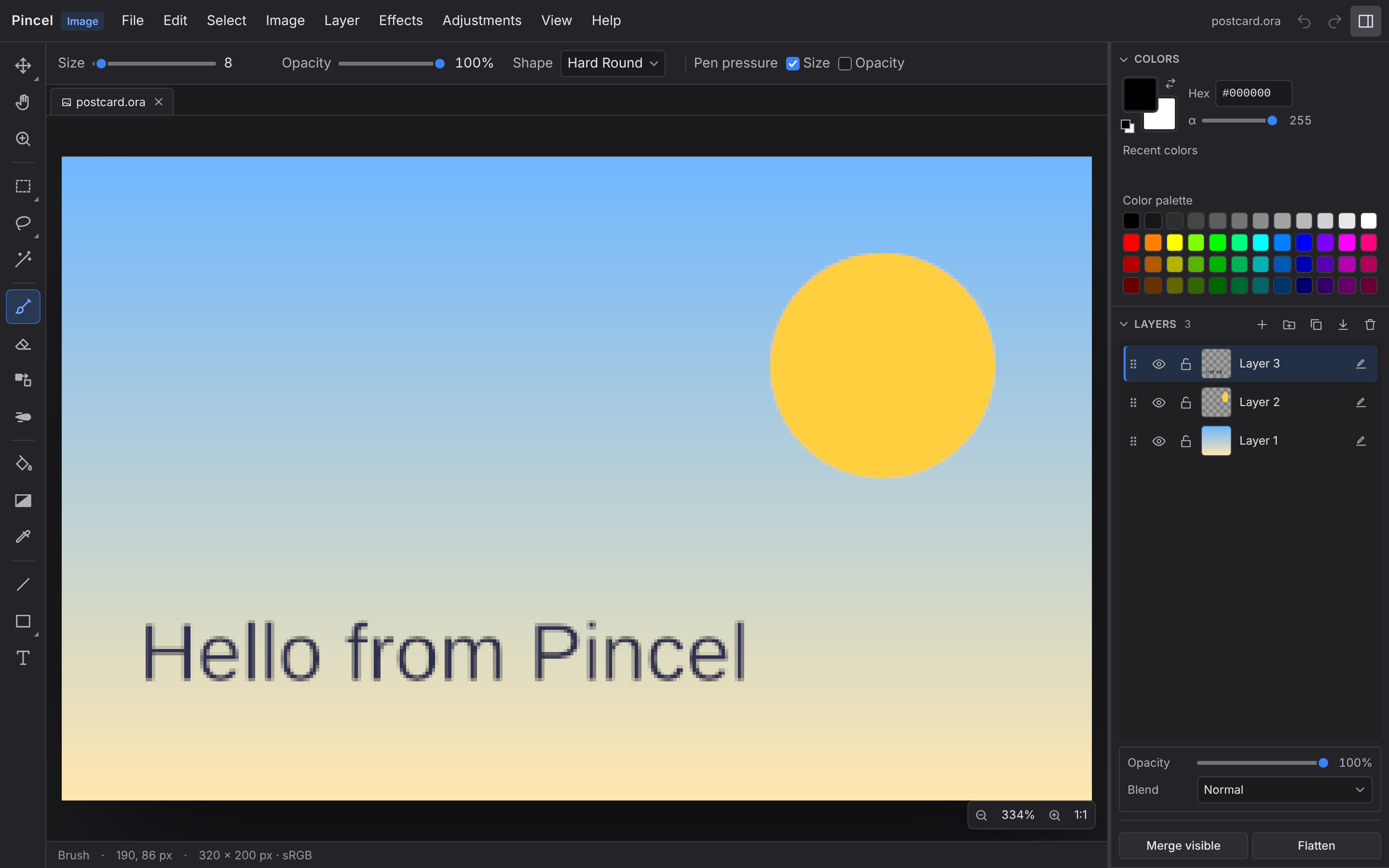
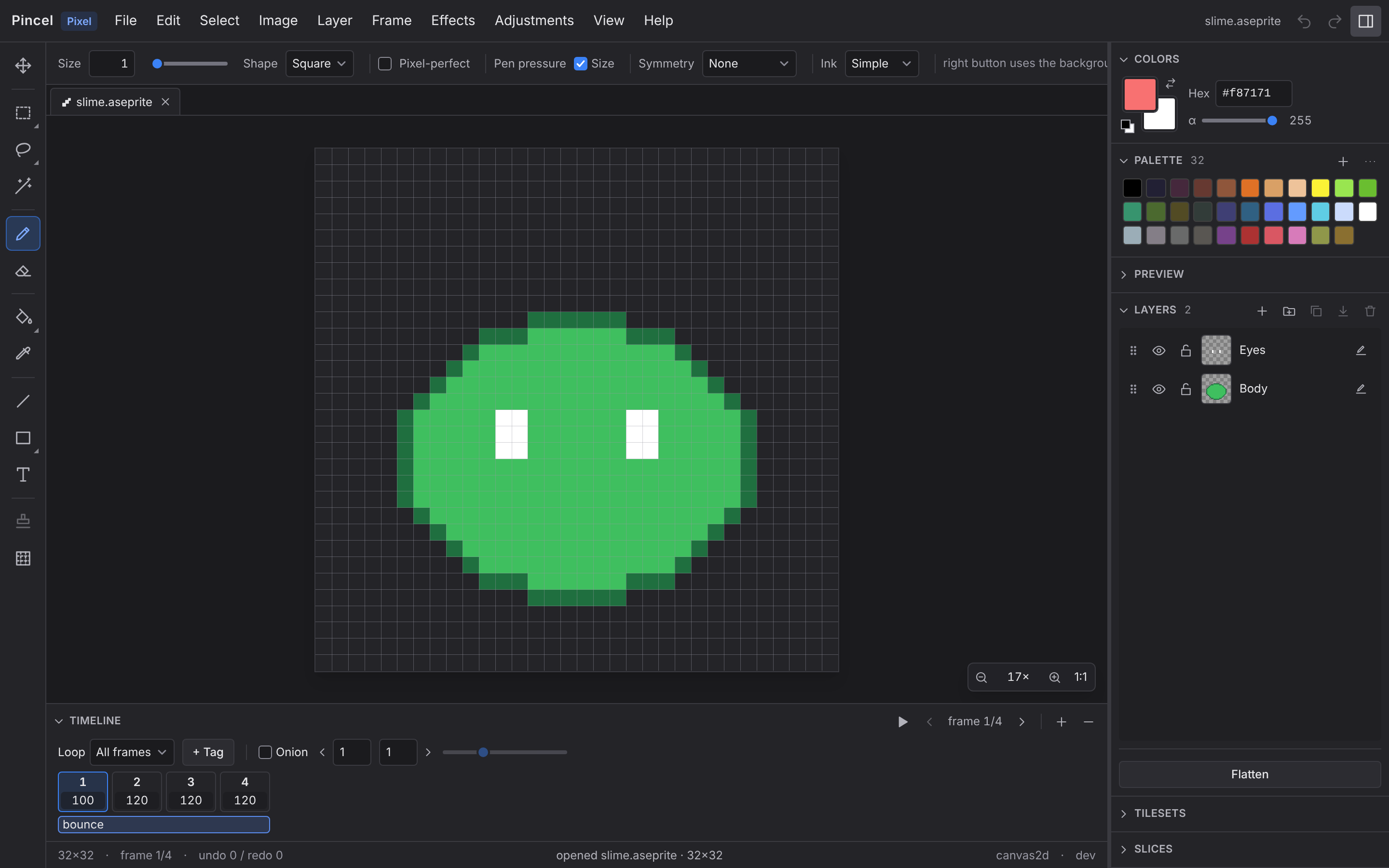
Pixel mode with the sample sprite open — tools on the left, palette, layers and the animation timeline with four framesImage mode with the sample postcard open — brush options on top, three layers with opacity and blend mode on the right

Pincel is two editors in one app, and the file decides which one opens. Pixel mode is built for game developers and pixel artists: it reads and writes the Aseprite file format, so your work fits into existing pipelines, with tilemaps, slices, animation tags, palettes and indexed color — the things you actually need. Image mode is a full paint.net-style editor for everything else — photos, screenshots, UI mockups, artwork — with layers, blend modes, brushes, selections, transforms, effects and adjustments; it opens PNG, JPEG, WebP, BMP, GIF and TIFF and saves OpenRaster so GIMP and Krita open it too.

Both run offline as a PWA or as a desktop app, speak English and German, and work on an iPad. Pincel is open source under MIT or Apache 2.0, and it will stay that way. It uses Aseprite's documented file format and is not affiliated with the Aseprite project.

Pincel

Features

  • The canvas

    Smooth zoom and pan up to 64× with pixel-perfect rendering, cursor-anchored wheel zoom and auto-fit on open. WebGPU rendering with a Canvas2D fallback.

  • Tools

    Pencil, eraser, bucket, line, rectangles, ellipses, rounded rectangles, polygons, eyedropper, move, text, and rectangle / ellipse / lasso / polygon / magic-wand selections. Each tool is small, focused and built around pixel-perfect input.

  • Layers

    Image layers, group layers, blend modes, opacity, visibility and locking, with thumbnails and drag-to-reorder. The Aseprite layer model — round-trips through Pincel and back into Aseprite without loss.

  • Frames and animation

    A timeline with per-frame durations, named tags with forward / reverse / ping-pong playback, onion skin, and sprite-sheet export with Aseprite-format JSON. Everything round-trips through the .aseprite file.

  • Tilemaps

    First-class tilemap layers. Build a tileset, stamp tiles on the canvas, flip and rotate per tile, and edit a tile in place to update it everywhere it appears.

  • Slices

    Named rectangular regions, optionally with 9-patch borders and pivot points, for hitboxes, UI and game logic. Your engine reads them straight out of the .aseprite file.

  • Palette

    New sprites start with DB32; switch to DB16, PICO-8, Game Boy or NES in one click. Import and export GIMP .gpl palettes, and recolor, add, delete and drag-reorder entries.

  • Open file formats

    Aseprite read and write are the source of truth — layer flags, user data and grid settings survive the trip. PNG frame export and sprite sheets with Aseprite-compatible JSON; Image mode saves OpenRaster (.ora). No proprietary format lock-in, ever.

  • Image mode

    A paint.net-style editor in the same app for everything that is not pixel art. PNG, JPEG, WebP, BMP, GIF and TIFF open with layers, blend modes, brushes, shapes, text, selections, transforms and the full set of effects and adjustments. Save as OpenRaster to keep the layers, or export flat images.

  • Tablet and pen

    In progress

    Two-finger pan and pinch-to-zoom in both modes. On-screen Shift and Alt toggles stand in for the keyboard, and the Image-mode brush follows pen pressure and tilt.

  • Desktop app

    Native builds for Windows, macOS and Linux with the system file dialogs, file associations and "Open with" from Explorer, Finder or the file manager. It installs for you only, without administrator rights, and updates itself in the background — every update signature-checked.

  • Offline in the browser

    Install Pincel from your browser as a PWA. It works offline, autosaves to IndexedDB and keeps your files on your device. The editor speaks English and German.

  • Embeddable

    In progress

    An npm package to mount the same editor in any DOM element of your own tool, built on pincel-core (Rust → WASM). Read and write Aseprite files and listen for changes, no iframe.

  • What's coming

    Planned

    Lua scripting. Custom brushes. A headless Node API for asset pipelines. A read-only viewer for embeds.

How it works

  1. Open — drag in a .aseprite file or start fresh.
  2. Edit — paint, animate, build tilemaps, define slices.
  3. Save — save back to .aseprite. Your engine hot-reloads.

Comparison

Honest comparison

FeaturesPincelAsepritePiskel
Aseprite file format (read + write)PartlyRGBA onlyYesnativeNo
TilemapsYesYesNo
Slices (9-patch, pivot)YesYesNo
Animation timeline + tagsYesYesYesbasic
Tablet / pen supportYesYesNo
Runs in browserYesNoYes
Layered image editing (photos, screenshots)YesImage modeNopixel art onlyNo
Native desktop appYesTauriYesYesvia NW.js, ageing
Embeddable as a libraryYesNoNo
Lua scripting / extensionsNoPhase 2YesNo
Custom brushesNoPhase 2YesYes
PriceFreePaidFree
Open sourceYesMIT/ApachePartlysource-available, EULA forbids redistributionYesApache 2.0
Active developmentYesYesPartlyno tagged release since 0.15.0 (2018); master still gets fixes

As of 28 October 2026· Pincel is new and Aseprite has 14 years of features. We're catching up where it matters for game-dev workflows. Where it doesn't, we're not.

Download

Latest release1.12.0· 12 November 2026Release notes

WindowsFor your system

Installation notes

The installer sets Pincel up for you only, in %LOCALAPPDATA%\Pincel, without administrator rights, with a Start menu entry. It registers Pincel for .aseprite, PNG, JPEG, WebP, and the other formats it opens; Windows lets only you choose the default app, so the first install opens Settings → Default apps on Pincel's page. Uninstall: Settings → Apps → Installed apps. The MSI package installs for all users and needs administrator rights. Windows on ARM runs the x64 build through the built-in emulation.

First start: the installer is not signed with a code-signing certificate, so SmartScreen shows "Windows protected your PC". Click More info, then Run anyway.

macOSFor your system

Installation notes

Open the disk image and drag Pincel into Applications. Finder then offers it under "Open With" for the formats it opens; make it the default through "Get Info" → "Open with" → "Change All".

First start: the app is not notarized by Apple, so macOS won't open it at first. Control-click it in Applications, choose Open, and confirm; on macOS 15 and newer, open it once, then go to System Settings → Privacy & Security → Open Anyway. Or in Terminal:

xattr -dr com.apple.quarantine /Applications/Pincel.app

LinuxFor your system

Installation notes

Requires x64 with glibc 2.35 or newer: Ubuntu 22.04, Debian 12, Fedora 36, and later.

The AppImage runs as downloaded once it is executable. Installed for you with --install (above), it gets a pincel command, an application-menu entry, and "Open with" for its formats: that copies it to ~/.local/share/pincel and links ~/.local/bin/pincel; uninstall with pincel --uninstall. On Ubuntu 24.04 and newer, AppImages need libfuse2t64 (sudo apt install libfuse2t64). The .deb and .rpm packages install through your package manager instead and are updated with it.

Install

Install the AppImage for you (Linux)
chmod +x pincel-linux-x64.AppImage && ./pincel-linux-x64.AppImage --install

Run it where you downloaded the AppImage. No root needed.

Register pincel-mcp with Claude Code
claude mcp add pincel -- pincel-mcp --workspace .

After putting the downloaded pincel-mcp binary on your PATH; the current folder becomes the workspace.

Verify: the checksums of all files are in SHA256SUMS. On Windows: Get-FileHash pincel-windows-x64-setup.exe; on macOS and Linux: shasum -a 256 or sha256sum.

Updates: the desktop app asks GitHub at most once a day for a new version, downloads it in the background, and checks its signature before installing; it takes effect at the next start (on Windows once you quit Pincel). Help → Check for Updates… checks right away, Help → Install Updates Automatically turns it off. The .deb and .rpm packages and an AppImage that was not installed with --install leave updates to you.

MCP server: rename the downloaded pincel-mcp-… file to pincel-mcp (pincel-mcp.exe on Windows), make it executable (chmod +x) and put it on your PATH. Options: --workspace <dir> (default: the current folder; files are read and written only inside it) and --read-only.

Or just use the browser: nothing to install — the editor runs in any modern browser, works offline, and installs from there as an app (PWA). Your files stay on your device either way.

Checksums (SHA256SUMS) — Verify a download against the SHA-256 sums of this release.

View on GitHub

Features

  • tauri: add Edit > Settings... (Cmd+,) to the native macOS menu (bf94c4c)
  • tauri: add files_exist to tell which recent paths still hold a file (3a93b29)
  • ui: add the Settings dialog and move app settings out of View (84b71c6)
  • ui: remove recent files whose file was deleted (AC-30, AC-31) (33a7f50)
  • ui: settings dialog and a tidy View menu (8f879b3)
  • ui: show the clipboard card in the start screen between the New cards and the clipboard row (361f592)

Bug Fixes

  • pincel-image-core: mark OpenRaster entries as made on Unix on every platform (ee89225)
  • ui: accept today's release wasm in the perf setup (175aa5c)
  • ui: drop deleted recent files and place the clipboard card in the start screen (416bf7c)
  • ui: find the bundle's wasm at its root path in the perf setup (8da8218)

Performance Improvements

  • faster convolutions, job digest pins and a working pnpm perf (3302708)
  • pincel-effects: convolve rows without per-tap clamping (b8f85ad)
  • pincel-effects: skip edge clamping inside the 3x3 convolution (275c3c5)
  • pincel-image-core: flatten over a background through lookup tables (caf9f64)
  • pincel-image-core: Image-mode quick wins for export, selection, open, thumbnails and redraw (1cbb72c)
  • pincel-image-core: move decoded RGBA8 pixels instead of copying (6e88011)
  • pincel-image-core: run selection modifiers in O(1) per pixel (b4316d3)
  • pincel-image-core: track a selection generation on the command bus (8f5c475)
  • pincel-image-wasm: compose group thumbnails at thumbnail size (03b51f9)
  • pincel-image-wasm: report the selection generation in DocumentInfo (692788d)
  • ui: present each Image-mode canvas change once per frame (2a5f98e)
  • ui: rebuild the selection outline only when the selection changes (4ab193a)
More →